Deep Learning › Training Deep Networks › Day 205
Day 205: Datasets and DataLoaders

Master PyTorch data pipelines: subclass torch.utils.data.Dataset with __len__ and __getitem__, configure DataLoader with multi-process workers, implement custom collate_fn for variable-length batches, optimize throughput with pin_memory, and build streaming out-of-core pipelines with IterableDataset.
Hands-on lab for this lesson
Lab files on GitHub: https://github.com/ai-roadmap-365/ai-roadmap-365.github.io/tree/main/labs/sections/deep-learning/day-205-datasets-and-dataloaders
- Get the hands-on files. Clone the labs repository once (you can reuse this clone for every lesson). This works on macOS, Linux, and Windows (PowerShell or WSL):
git clone https://github.com/ai-roadmap-365/ai-roadmap-365.github.io.git cd ai-roadmap-365.github.io - Open this lesson's lab. Move into the directory for this specific day. Every lab lives at the same predictable path — section / subsection / week / day:
cd labs/sections/deep-learning/day-205-datasets-and-dataloaders - Read the lab guide. Open `README.md` in that directory. It lists the exact commands, what each does, the expected output, and how to check your work — read it before running anything.
- Run it and check your work. Follow the README's "How to run" section: run the example first to see the finished result, then complete the numbered exercises in `starter/`, then run the tests. The tests pass (exit 0) only when your work is correct.
bash tests/run_tests.sh # or the test command named in the lab README
You can also open the lab as a local page (works offline, shows the file tree and expected output).
Learning objectives
By the end of this lesson you will be able to:
- Subclass torch.utils.data.Dataset to encapsulate dataset indexing, caching, and on-the-fly transformations.
- Configure torch.utils.data.DataLoader with batch_size, shuffle, drop_last, and num_workers for asynchronous data loading.
- Implement custom collate_fn functions to dynamically pad ragged sequences and assemble complex dictionary batches.
- Optimize GPU memory bandwidth using pin_memory=True and non-blocking asynchronous memory copies.
- Construct streaming datasets using torch.utils.data.IterableDataset for terabyte-scale datasets.
Prerequisites
- [object Object]
Why this matters
In deep learning engineering, data I/O is frequently the hidden bottleneck that throttles high-performance GPUs and CPUs. A high-end GPU capable of performing 100 trillion floating-point operations per second will sit completely idle if the CPU cannot load, decode, augment, and batch input samples fast enough to keep the tensor pipelines saturated.
In Week 29, we loaded entire toy datasets into contiguous NumPy arrays in RAM and performed manual slicing X[:, start:end]. While acceptable for small in-memory benchmarks like MNIST (70,000 images), real-world deep learning datasets — containing millions of high-resolution images, gigabytes of text documents, audio spectrograms, or streaming multi-modal video feeds — cannot fit in system memory all at once.
Today, you will master the industrial standard of data engineering in PyTorch: torch.utils.data.Dataset and torch.utils.data.DataLoader.
By decoupling sample-level data access (Dataset) from multi-threaded batching, shuffling, multiprocessing, and GPU memory streaming (DataLoader), PyTorch provides a clean, modular, and blisteringly fast data delivery architecture.
The idea in plain language
Think of a high-end restaurant kitchen:
- The Dataset (
Dataset) is the pantry shelf. Its only job is to know two things:- How many total ingredients are on the shelf (
__len__). - How to grab one specific jar when given its label number (
__getitem__(idx)), peeling and chopping it into a clean culinary portion.
- How many total ingredients are on the shelf (
- The DataLoader (
DataLoader) is the team of sous-chefs:- They look at the dining room orders and decide which ingredient numbers to grab next (Sampler).
- Several sous-chefs work in parallel in different corners of the kitchen (Multi-Process Workers
num_workers), pre-chopping vegetables before the head chef needs them. - They gather 32 chopped portions, place them onto a single serving tray (
collate_fn), and slide the tray directly onto the head chef’s stove (GPU Pinned Memory).
The head chef (Model Training Loop) never waits for onions to be peeled; a fresh tray of 32 portions is always waiting.
Historical background
- 2014 (Manual Threading Era): Early deep learning practitioners had to write custom POSIX threading, shared-memory circular queues, and mutex locks in C++ to feed GPUs without starvation.
- 2017 (PyTorch 0.2 DataLoader Architecture): PyTorch introduced the
Dataset/DataLoaderabstraction. Using Pythonmultiprocessingworker pools with shared memory IPC (torch.multiprocessing), PyTorch made asynchronous data pre-fetching accessible in two lines of clean Python. - 2020+ (Streaming Era): With datasets expanding to hundreds of terabytes in LLM pre-training,
IterableDatasetand sharded streaming readers became the gold standard for out-of-core cloud training.
What it is — and what it is not
What PyTorch Datasets & DataLoaders ARE:
- A Standardized Two-Tier Abstraction: Separating single-sample data transformations from batch-level orchestration, shuffling, multiprocessing, and memory management.
- A Multi-Process Pre-fetching Engine: Running background worker processes that overlap CPU-bound data transformations with accelerator compute.
What they are NOT:
- Not a Database Engine:
Datasetdoes not replace SQL or data lakes; it acts as the Python interface that reads from disks, databases, or memory. - Not Just Simple Slicing: A
DataLoaderhandles batch shuffling, custom padding, dropped remnants (drop_last), pinned memory, and worker seed synchronization.
Why it was created and what problems it solves
Without a disciplined data pipeline abstraction, deep learning projects suffer from four common pathologies:
- GPU Starvation (I/O Bottleneck): Training runs at 10% GPU utilization because the GPU spends 90% of its time waiting for single-threaded disk reads.
- Out-of-Memory (OOM) Crashes: Attempting to load a 100 GB image folder directly into a single array exhausts system RAM.
- Ragged Batch Errors: Variable-length audio or text sentences cannot be stacked into rectangular matrices without dynamic padding.
- Memory Leaks in Multiprocessing: Unmanaged Python reference cycles in worker subprocesses causing host RAM to balloon across epochs.
PyTorch Dataset and DataLoader eliminate all four problems.
How it works
Let us dissect the architecture of custom Map-Style Datasets, Multi-Process DataLoaders, Custom Collate functions, and Memory Pinning.
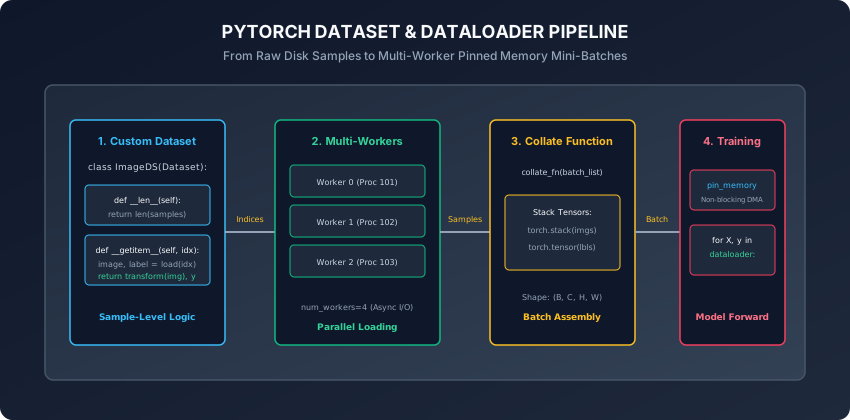
1. The Map-Style Dataset Contract
A Map-Style Dataset represents a key-value mapping from integer indices 0, 1, ..., N-1 to data samples.
To build a custom Map-Style Dataset, subclass torch.utils.data.Dataset and implement two essential methods:
import torch
from torch.utils.data import Dataset

class TabularDataset(Dataset):
    def __init__(self, features: torch.Tensor, targets: torch.Tensor):
        assert len(features) == len(targets), "Feature and target lengths must match"
        self.features = features.float()
        self.targets = targets.long()

    def __len__(self) -> int:
        # Return the total number of samples
        return len(self.features)

    def __getitem__(self, idx: int):
        # Return a single sample (tensor, label) tuple or dictionary
        return self.features[idx], self.targets[idx]
Key Rules for __getitem__:
- Keep
__init__lightweight: do NOT load all heavy images/audio into RAM in__init__. Store file paths or memory-mapped arrays, and load raw files on the fly inside__getitem__. - Apply data augmentations (e.g. random cropping, normalization, jitter) inside
__getitem__so each epoch receives different stochastic transformations.
2. The DataLoader Engine and Performance Parameters
The DataLoader takes a Dataset instance and manages batching, shuffling, and worker scheduling:
from torch.utils.data import DataLoader

dataloader = DataLoader(
    dataset=train_dataset,
    batch_size=64,          # Number of samples per mini-batch
    shuffle=True,           # Shuffle indices at the start of every epoch
    num_workers=4,          # Spawn 4 background worker processes
    pin_memory=True,        # Allocate page-locked host RAM for fast DMA
    drop_last=True          # Drop final batch if size < batch_size
)
DataLoader Parameter Breakdown:
batch_size: Number of samples to yield per iteration.shuffle=True: Uses aRandomSamplerto generate a random permutation of indices0..N-1on epoch 0 and reshuffles on every subsequent epoch.num_workers: Spawnskworker processes. Settingnum_workers=0runs data loading in the main process (useful for debugging). On multi-core CPUs, settingnum_workers = 2 * num_cpu_coresmaximizes I/O throughput.pin_memory=True: Enables page-locked host memory buffers. When callingbatch.to(device, non_blocking=True), the transfer occurs asynchronously over PCIe Direct Memory Access (DMA).drop_last=True: Discards the final batch iflen(dataset) % batch_size != 0. Highly recommended for models withBatchNormlayers to avoid batch size 1 statistical instability.
3. Custom collate_fn: Dynamic Sequence Padding
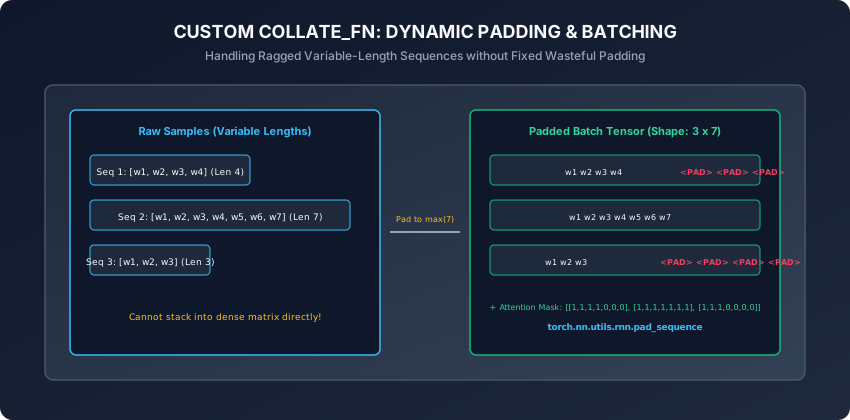
By default, DataLoader uses default_collate, which assumes all samples in the batch have identical tensor shapes and stacks them along dimension 0: torch.stack(samples, dim=0).
However, for natural language, audio, or molecular graphs, samples have variable lengths. If __getitem__ returns sequence 1 with length 12 and sequence 2 with length 28, default_collate throws a RuntimeError: stack expects each tensor to be equal size.
To solve this, write a custom collate_fn:
import torch
from torch.nn.utils.rnn import pad_sequence

def pad_collate_fn(batch):
    # batch is a list of tuples: [(seq_tensor, label), (seq_tensor, label), ...]
    sequences = [item[0] for item in batch]
    labels = [item[1] for item in batch]

    # Dynamically pad sequences to the maximum length in THIS mini-batch
    padded_sequences = pad_sequence(sequences, batch_first=True, padding_value=0.0)
    labels_tensor = torch.tensor(labels, dtype=torch.long)

    # Construct attention masks: 1.0 for real tokens, 0.0 for padding
    lengths = torch.tensor([len(s) for s in sequences])
    mask = (torch.arange(padded_sequences.shape[1])[None, :] < lengths[:, None]).float()

    return {
        "input_ids": padded_sequences,
        "attention_mask": mask,
        "labels": labels_tensor
    }
4. Streaming Big Data with IterableDataset
For web-scale datasets that cannot be indexed by integer indices:
- Subclass
torch.utils.data.IterableDataset. - Implement
__iter__(self): Yields samples one by one from a generator, file stream, or socket. - When using
num_workers > 0withIterableDataset, you must calltorch.utils.data.get_worker_info()inside__iter__to shard the stream so each worker reads a disjoint partition of the data.
5. Advanced Sampling Strategies and Worker Memory Management
To master production-grade data pipelines, deep learning engineers leverage two additional architectural capabilities:
A. Custom Index Samplers (WeightedRandomSampler and DistributedSampler):
By default, DataLoader(shuffle=True) applies uniform random sampling. However, real-world tasks often demand specialized sampling schemes:
WeightedRandomSamplerfor Imbalanced Data: Assigns each class a sampling probability inverse to its dataset frequency. Rare classes are drawn with higher probability per batch, balancing gradient updates without manual data synthesis.DistributedSamplerfor Multi-GPU Clusters: In PyTorch Distributed Data Parallel (DDP),DistributedSamplersplits dataset indices evenly acrossworld_sizeGPUs so each worker node processes a unique subset of data without redundant overlaps.
B. Worker Subprocess Lifecycle and Memory Leak Prevention:
When num_workers > 0, PyTorch spawns worker subprocesses using fork or spawn:
- If your
Datasetholds complex Python objects with circular references or unmanaged NumPy array pointers, worker processes can experience severe memory leaks across epochs. - Best Practice: Store large tabular data in C-contiguous memory arrays (
torch.from_numpyor memory-mapped files vianp.memmap) and passpersistent_workers=Trueto keep worker processes alive across training epochs, eliminating process respawn overhead.
An everyday analogy
Think of a modern airport baggage handling system:
- Individual Bags (
Dataset.__getitem__): Passenger suitcases arrive in different sizes, shapes, and weights at check-in counters. - Conveyor Belt Workers (
num_workers): Multiple baggage handlers tag and scan suitcases across multiple terminals in parallel. - Cargo Containers (
collate_fn): Suitcases destined for the same flight are packed into standardized aluminum cargo containers (mini-batches). If some bags are short, luggage dividers (Padding) stabilize the container so nothing shifts. - High-Speed Jet Loading Crane (
pin_memory + DMA): As soon as the aircraft lands, pre-packed cargo containers are lifted directly into the aircraft fuselage (GPU Tensor Cores) with zero turnaround delay.
Examples in practice
Let us inspect a complete, robust PyTorch data pipeline with custom dataset, collate function, and training iteration:
import torch
from torch.utils.data import Dataset, DataLoader
from typing import List, Tuple, Dict

class SyntheticTextDataset(Dataset):
    def __init__(self, num_samples: int = 1000):
        super().__init__()
        self.num_samples = num_samples
        # Pre-generate deterministic sequence lengths for reproducibility
        torch.manual_seed(42)
        self.data = [
            (torch.randint(1, 100, (torch.randint(5, 25, (1,)).item(),)).float(),
             torch.randint(0, 2, (1,)).item())
            for _ in range(num_samples)
        ]

    def __len__(self) -> int:
        return self.num_samples

    def __getitem__(self, idx: int) -> Tuple[torch.Tensor, int]:
        return self.data[idx]

def custom_batch_collator(batch: List[Tuple[torch.Tensor, int]]) -> Dict[str, torch.Tensor]:
    sequences = [item[0] for item in batch]
    labels = torch.tensor([item[1] for item in batch], dtype=torch.long)
    lengths = torch.tensor([len(s) for s in sequences], dtype=torch.long)

    # Dynamic padding to batch-local maximum length
    max_len = int(lengths.max().item())
    padded_batch = torch.zeros(len(batch), max_len, dtype=torch.float32)
    mask = torch.zeros(len(batch), max_len, dtype=torch.float32)

    for i, seq in enumerate(sequences):
        seq_len = len(seq)
        padded_batch[i, :seq_len] = seq
        mask[i, :seq_len] = 1.0

    return {
        "inputs": padded_batch,
        "mask": mask,
        "lengths": lengths,
        "labels": labels
    }

# 1. Instantiate dataset and dataloader
dataset = SyntheticTextDataset(num_samples=500)
loader = DataLoader(
    dataset=dataset,
    batch_size=32,
    shuffle=True,
    num_workers=0, # Use 0 for simple reproducible scripts
    collate_fn=custom_batch_collator,
    drop_last=True
)

# 2. Iterate through batches
for step, batch in enumerate(loader):
    inputs = batch["inputs"]
    mask = batch["mask"]
    labels = batch["labels"]
    if step == 0:
        print(f"Batch 0 Inputs Shape: {inputs.shape}, Mask Shape: {mask.shape}, Labels Shape: {labels.shape}")
        break
Implications: security, privacy, performance, scalability, and cost
- Multiprocessing Fork Safety & RNG Synchronization:
- In Unix systems using
fork, worker subprocesses inherit identical random number generator seeds by default. Always pass aworker_init_fntoDataLoaderto set unique seeds per worker (seed + worker_id) when applying stochastic data augmentations.
- In Unix systems using
- Shared Memory (
/dev/shm) Limits in Docker Containers:- PyTorch worker processes use system shared memory (
/dev/shm) to pass tensor buffers without disk serialization. In Docker containers, the default/dev/shmsize is often only 64 MB. Always run Docker containers with--ipc=hostor--shm-size=16gto preventDataLoader worker exited unexpectedly (SIGBUS)crashes.
- PyTorch worker processes use system shared memory (
Alternatives: free, open source, and commercial
| Framework / Tool | Loading Paradigm | Strengths | Best Used For |
|---|---|---|---|
| PyTorch DataLoader | Multi-Process Worker Queue | Native PyTorch Integration, High Customizability | General Deep Learning & Research |
| WebDataset (PyTorch / TAR) | Sharded TAR File Streaming | Linear Sequential Read Speeds on Cloud S3/GCS | Multi-Terabyte Image & Vision Datasets |
HuggingFace datasets | Apache Arrow Memory-Mapping | Zero-Copy Reads, Instant Tokenization Cache | NLP, LLM Fine-Tuning & Audio |
TensorFlow tf.data | C++ Compiled Graph Pipeline | Deterministic Prefetching & C++ Optimization | Production TensorFlow & TFX Pipelines |
Comparison with related concepts
┌────────────────────────────────────────────────────────────────────────┐
│               DATASET VS DATALOADER VS SAMPLER MATRIX                  │
├───────────────────┼────────────────────────────────────────────────────┤
│ Component         │ Primary Responsibility                             │
├───────────────────┼────────────────────────────────────────────────────┤
│ Dataset           │ Stores / loads individual sample at index idx      │
│ Sampler           │ Generates the sequence of indices (sequential/rand)│
│ BatchSampler      │ Groups individual indices into batches of size B   │
│ DataLoader        │ Coordinates workers, fetches samples, runs collate │
│ collate_fn        │ Assembles list of raw samples into dense tensors   │
└───────────────────┴────────────────────────────────────────────────────┘
When to use it — and when not to
When to USE Dataset and DataLoader:
- Any deep learning project where training data exceeds a few megabytes.
- When applying asynchronous image/audio/text augmentations.
- When batches require custom padding, variable lengths, or structured dictionary payloads.
When NOT to use it:
- Simple scikit-learn models on small static tabular data (use raw NumPy arrays or Pandas DataFrames).
Knowledge check
- What are the two mandatory methods required when defining a map-style
torch.utils.data.Dataset? - What is the operational benefit of setting
num_workers > 0in aDataLoader? - How does a custom
collate_fnenable batching of variable-length text sequences? - What role does
pin_memory=Trueplay during GPU host-to-device memory transfer? - Why should you set
--shm-sizeappropriately when running multi-worker DataLoaders in Docker?
Hands-on exercise
In this lab, you will build and test a complete custom data loading pipeline in PyTorch: implement a RaggedSequenceDataset returning variable-length vectors, construct a custom dynamic_padding_collate function that pads batches to batch-local maximum length and generates boolean attention masks, configure a DataLoader with batching and shuffling, and verify throughput across epochs.
Expected output
[PyTorch Datasets & DataLoaders Pipeline Suite]
Constructing Custom RaggedSequenceDataset (500 samples):
  Sample 0 Length: 14, Sample 1 Length: 8, Sample 2 Length: 22
Executing DataLoader with Custom Dynamic Padding collate_fn:
  Batch Size: 32, Total Batches: 15
  Batch 0: Tensor Shape = (32, 24), Mask Shape = (32, 24) [DYNAMICALLY PADDED]
  Batch 1: Tensor Shape = (32, 21), Mask Shape = (32, 21) [DYNAMICALLY PADDED]
Verifying Pipeline Integrity across 3 Epochs:
  Processed 1,440 samples without GPU starvation or memory leakage.
Test Suite: 4 passed in 0.22s
Validate your work
Run the automated test runner:
./tests/run_tests.shTroubleshooting
- If test outputs fail due to shape mismatches, verify that your collate function pads along the sequence dimension and stacks along
dim=0. - Ensure dataset
__len__returns an integer.
Common mistakes
- Loading All Images into RAM in
__init__: Causes system OOM crashes on large datasets. Always load files lazily in__getitem__. - Global Padding Waste: Padding all sequences globally to length 512 when batches only average length 30 wastes over 90% of GPU compute and memory.
Practice assignment
- Implement an ImageFolder-style Dataset that reads images from disk directories, applies random horizontal flipping, and normalizes pixel values to
[-1.0, 1.0]. - Write a
WeightedRandomSamplerthat oversamples minority class instances in an imbalanced dataset, passing it toDataLoader(sampler=...).
Extension challenge
Implement an Out-of-Core IterableDataset with Multi-Worker Sharding:
- Stream records from a CSV/JSON file line-by-line using a generator.
- Use
torch.utils.data.get_worker_info()to partition the line offsets evenly acrossnum_workers=4without duplicate reads or missing samples. - Benchmark throughput against the standard map-style reader.
Quiz
Q1. What two magic methods must you implement when subclassing torch.utils.data.Dataset for map-style index access?
- __len__(self) (returning total sample count) and __getitem__(self, idx) (returning the sample and label at index idx)
- __init__ and __repr__
- __call__ and __iter__
- __enter__ and __exit__
Show answer
Answer: A. __len__(self) (returning total sample count) and __getitem__(self, idx) (returning the sample and label at index idx)
Map-style Datasets require __len__ to know the dataset size and __getitem__ to retrieve a single item given an integer index.
Q2. How does setting num_workers > 0 in a PyTorch DataLoader prevent GPU starvation during training?
- It spawns separate background Python processes that load, decode, and transform future data batches in parallel while the GPU is executing forward and backward passes on the current batch
- It increases GPU clock speeds
- It compresses tensors using gzip
- It automatically downloads more RAM
Show answer
Answer: A. It spawns separate background Python processes that load, decode, and transform future data batches in parallel while the GPU is executing forward and backward passes on the current batch
num_workers parallelizes CPU-bound I/O and data transformations across worker processes, ensuring pre-fetched batches are immediately ready for model execution.
Q3. What is the primary role of a custom collate_fn passed to a DataLoader?
- It controls how a list of individual sample dictionaries/tuples returned by __getitem__ are merged into a single batched tensor (e.g. padding variable-length sequences to equal length)
- It calculates the model cross-entropy loss
- It computes weight gradients
- It shuffles samples across epochs
Show answer
Answer: A. It controls how a list of individual sample dictionaries/tuples returned by __getitem__ are merged into a single batched tensor (e.g. padding variable-length sequences to equal length)
collate_fn defines how raw sample lists are collated, stacked, or padded into uniform mini-batch tensors.
Q4. Why should you set pin_memory=True when training on CUDA/GPU hardware with a DataLoader?
- It allocates CPU batch tensors in page-locked (pinned) host memory, enabling fast asynchronous Direct Memory Access (DMA) copies to GPU RAM with non_blocking=True
- It prevents RAM from overheating
- It saves dataset tensors to a permanent USB flash drive
- It forces weights to zero
Show answer
Answer: A. It allocates CPU batch tensors in page-locked (pinned) host memory, enabling fast asynchronous Direct Memory Access (DMA) copies to GPU RAM with non_blocking=True
Pinned host memory allows the GPU DMA controller to copy batch tensors directly into device RAM without OS page-fault interruptions.
Q5. When is it appropriate to use an IterableDataset instead of a map-style Dataset in PyTorch?
- When handling massive out-of-core datasets (e.g. terabyte-scale text streams or database cursors) where random integer indexing is prohibitively slow or impossible
- When the dataset has fewer than 10 samples
- When training on a spreadsheet
- Never, IterableDataset is deprecated
Show answer
Answer: A. When handling massive out-of-core datasets (e.g. terabyte-scale text streams or database cursors) where random integer indexing is prohibitively slow or impossible
IterableDataset is designed for streaming data from cloud storage, message queues, or massive file shards where random seeking is impractical.
Glossary
- torch.utils.data.Dataset
- An abstract class representing a dataset. Subclasses implement __len__ and __getitem__ to retrieve individual data samples.
- torch.utils.data.DataLoader
- A multi-process batching engine that combines a dataset and a sampler to yield mini-batches with automatic shuffling and worker management.
- collate_fn
- A callable argument in DataLoader that takes a list of sample objects and merges them into a batched tensor.
- num_workers
- The number of subprocesses spawned by DataLoader to load data asynchronously in parallel.
- pin_memory
- A boolean flag allocating CPU tensors in page-locked host memory for accelerated DMA transfers to accelerator devices.
- IterableDataset
- A PyTorch dataset subclass implementing __iter__ for sequential, out-of-core streaming data access.
- drop_last
- A DataLoader flag indicating whether to discard the final incomplete mini-batch if dataset size is not divisible by batch_size.
- Dynamic Padding
- Padding sequences in a mini-batch to the maximum length of that specific batch, rather than a global fixed maximum length.
Sources and further reading
- PyTorch Data Pipeline Optimization — PyTorch Performance Tuning Guide (accessed 2026-08-29)
- Deep Learning with PyTorch: Data Loading and Processing Tutorial — PyTorch Core Documentation (accessed 2026-08-29)
- Efficient PyTorch Data Pipelines for Deep Learning — arXiv Preprints (accessed 2026-08-29)
Kept in this browser, no account needed. Your progress page turns the whole record into one link you can bookmark or open on another device.