Deep Learning › Transformers › Day 230
Day 230: Hugging Face Transformers in Practice

Master the Hugging Face Transformers ecosystem for production deep learning: understand AutoModel and AutoTokenizer dynamic resolution, implement efficient tokenization pipelines with dynamic padding, configure TrainingArguments and the production Trainer API, evaluate models with precision/recall/F1 metrics, and save production safetensors checkpoints.
Hands-on lab for this lesson
Lab files on GitHub: https://github.com/ai-roadmap-365/ai-roadmap-365.github.io/tree/main/labs/sections/deep-learning/day-230-hugging-face-transformers-in-practice
- Get the hands-on files. Clone the labs repository once (you can reuse this clone for every lesson). This works on macOS, Linux, and Windows (PowerShell or WSL):
git clone https://github.com/ai-roadmap-365/ai-roadmap-365.github.io.git cd ai-roadmap-365.github.io - Open this lesson's lab. Move into the directory for this specific day. Every lab lives at the same predictable path — section / subsection / week / day:
cd labs/sections/deep-learning/day-230-hugging-face-transformers-in-practice - Read the lab guide. Open `README.md` in that directory. It lists the exact commands, what each does, the expected output, and how to check your work — read it before running anything.
- Run it and check your work. Follow the README's "How to run" section: run the example first to see the finished result, then complete the numbered exercises in `starter/`, then run the tests. The tests pass (exit 0) only when your work is correct.
bash tests/run_tests.sh # or the test command named in the lab README
You can also open the lab as a local page (works offline, shows the file tree and expected output).
Learning objectives
By the end of this lesson you will be able to:
- Use AutoModelForSequenceClassification and AutoTokenizer to load pretrained checkpoints from the Hugging Face Hub.
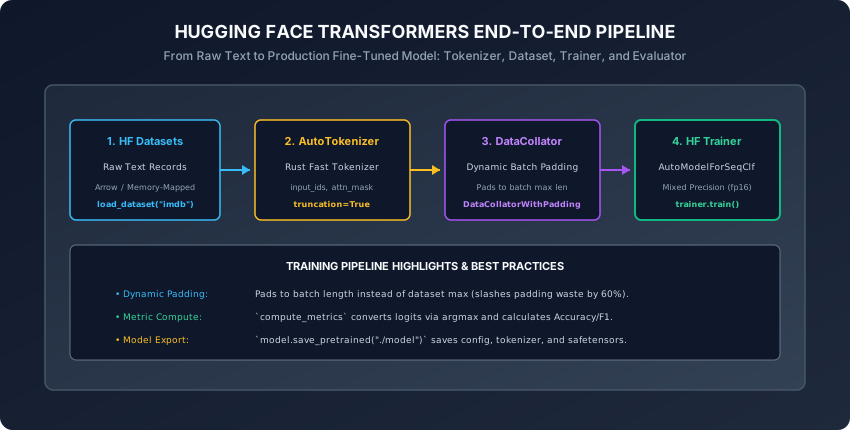
- Implement dynamic batch padding using DataCollatorWithPadding to eliminate unnecessary computation on padded tokens.
- Configure TrainingArguments with mixed precision (fp16/bf16), cosine learning rate schedules, and evaluation strategies.
- Implement custom compute_metrics functions to calculate classification accuracy, precision, recall, and F1 scores.
- Save, reload, and package fine-tuned transformer models using the Safetensors serialization format.
Prerequisites
Why this matters
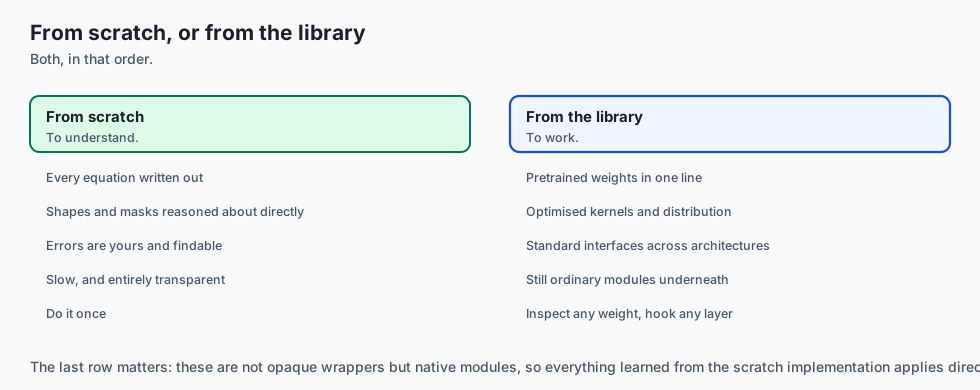
Writing custom PyTorch classes for Multi-Head Attention and transformer blocks from scratch (as you did over Days 225–229) is essential for mastering the mathematical foundations.
However, in professional production engineering:
- Downloading raw model weight checkpoints from Google Cloud buckets, matching custom tensor names, implementing custom BPE subword tokenizers in C++, and manually writing multi-GPU Distributed Data Parallel (DDP) loops is slow, error-prone, and reinvents the wheel.
- In 2019, Hugging Face revolutionized modern AI by releasing the
transformerslibrary, unifying thousands of transformer architectures under a clean, standardized, production-grade Python API.
Today, Hugging Face is the universal operating system of deep learning. Whether fine-tuning a small DistilBERT classifier or serving a 70B parameter LLaMA model, mastering Hugging Face’s AutoClasses, DataCollators, Trainer API, and Safetensors is an indispensable core competency for every AI practitioner.
The idea in plain language
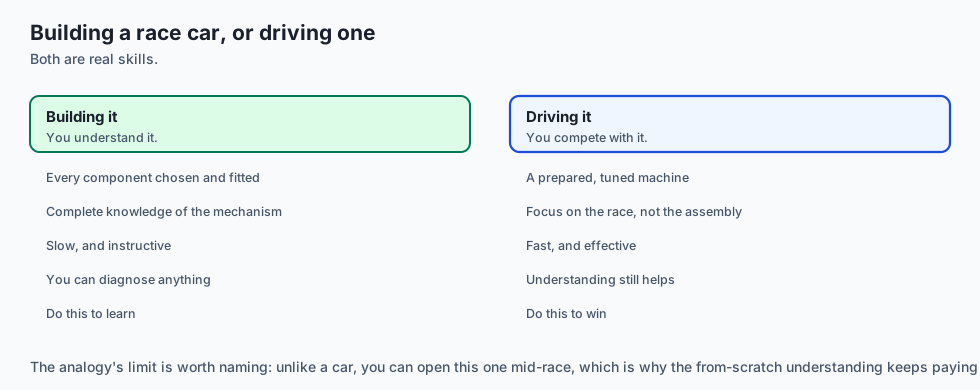
Think of building high-performance race cars:
- Custom PyTorch from Scratch (Days 225–229): You forge the engine pistons, machine the crankshaft, and wire the ignition coils by hand in a machine shop (Mastering Deep Mechanics).
- Hugging Face Transformers (Day 230): You enter a Formula 1 pit garage with standardized modular components:
- You request a V12 twin-turbo engine (
AutoModel.from_pretrained()). - You connect a precision computerized fuel injection system (
AutoTokenizer.from_pretrained()). - You attach a computerized telemetry diagnostic system (
Trainerandcompute_metrics). - You swap out the engine in 30 seconds to race on different tracks with zero rewiring.
- You request a V12 twin-turbo engine (
Historical background
- 2018 (PyTorch-BERT by Hugging Face): Thomas Wolf ported Google’s original TensorFlow BERT code to PyTorch in an open-source repository that gained 10,000 GitHub stars in weeks.
- 2019 (Transformers v2 & AutoClasses): Unified BERT, GPT-2, RoBERTa, XLNet, and DistilBERT under standardized
AutoModelandAutoTokenizerinterfaces. - 2020 (The Trainer API & Rust Tokenizers): Introduced the
Trainerclass to automate mixed-precision FP16, gradient accumulation, and evaluation loops, alongside the Rust-backedtokenizerslibrary capable of processing 1 Gigabyte of text in under 20 seconds. - 2022 (Safetensors): Introduced the secure, non-executable, zero-copy
safetensorsformat to replace dangerous Pythonpicklefiles across the entire AI ecosystem.
What it is — and what it is not
What Hugging Face Transformers IS:
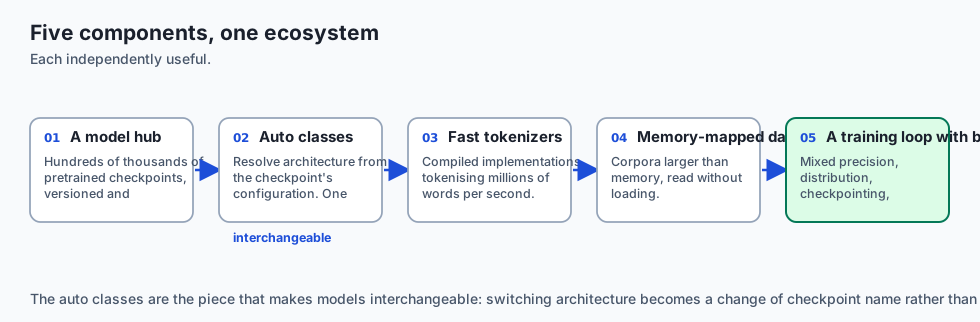
- A Standardized Abstraction Layer: An open-source framework providing unified access to
> 500,000pretrained models on the Hugging Face Hub. - A Production Training & Evaluation Engine: A complete suite including tokenizers, memory-mapped datasets, dynamic collators, and multi-GPU distributed training wrappers.
What it is NOT:
- Not a Black Box that Hides PyTorch: Hugging Face models are native PyTorch
nn.Modulesubclasses. You can inspect every weight tensor, register custom hooks, or extract intermediate layer activations at will.
Why it was created and what problems it solves
The Hugging Face ecosystem solved four major engineering bottlenecks:
- Model Portability: Switch from
bert-base-uncasedtoroberta-baseordeberta-v3-smallwith a single-line string change. - Dynamic Padding Efficiency: Prevents wasting GPU memory on padding tokens by sizing batches dynamically.
- Training Boilerplate Elimination: Removes hundreds of lines of tedious training loop code (gradient clipping, learning rate warmup, evaluation intervals, model checkpointing).
- Supply Chain Security: Eliminates security vulnerabilities via Safetensors format.
How it works
Let us dissect the core components of the Hugging Face development pipeline.
1. AutoClasses: Dynamic Architecture Resolution
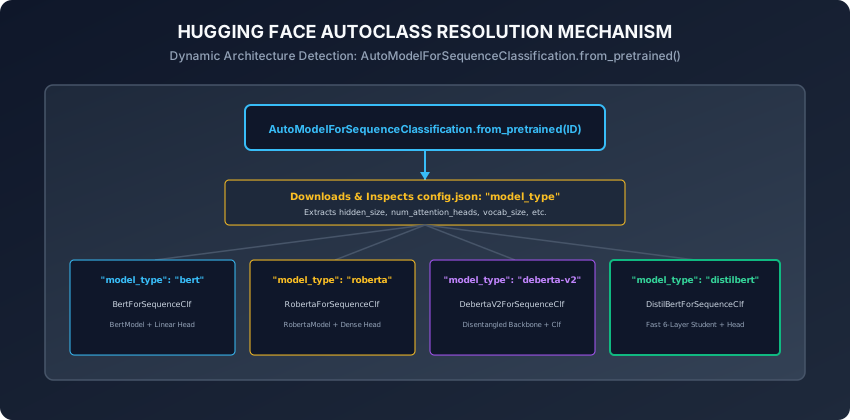
When you invoke:
from transformers import AutoModelForSequenceClassification, AutoTokenizer

model_id = "distilbert-base-uncased"
tokenizer = AutoTokenizer.from_pretrained(model_id)
model = AutoModelForSequenceClassification.from_pretrained(model_id, num_labels=2)
What happens under the hood?
- Metadata Inspection: Hugging Face downloads
config.jsonfrom the Hub and reads"model_type": "distilbert". - Dynamic Class Dispatch: Maps
"distilbert"\rightarrowDistilBertForSequenceClassification. - Weight Loading: Loads pretrained backbone weights into the transformer layers.
- Classification Head Attachment: Initializes a new, untrained linear classification head
W \in \mathbb{R}^{d_{\text{model}} \times \text{num\_labels}}(and prints a notification that the head must be fine-tuned).
2. High-Performance Tokenization & Dynamic Padding
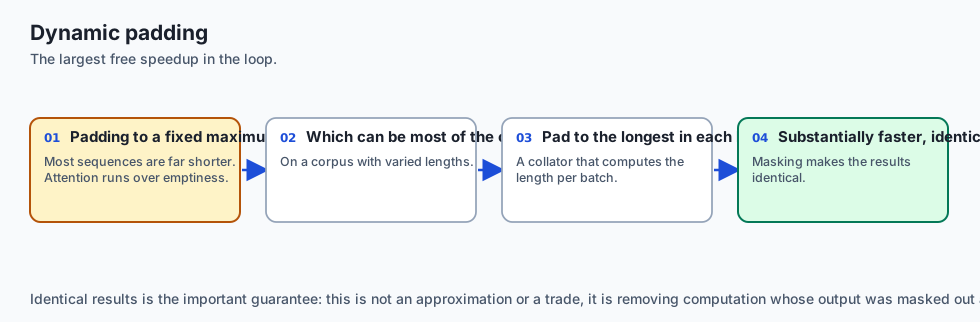
The Rust-backed tokenizers library tokenizes millions of words per second:
def tokenize_function(examples):
    return tokenizer(
        examples["text"],
        truncation=True,
        max_length=512
        # DO NOT pad here! Dynamic padding happens in the DataCollator!
    )
Why Dynamic Padding Matters:
- If a dataset has sequences ranging from 20 to 500 tokens, padding every sequence to 512 tokens forces the GPU to compute attention over empty pad tokens
80\%of the time. DataCollatorWithPadding: Receives a batch of tokenized sequences (e.g. lengths 45, 62, 58) and pads them only to the maximum length in that specific batch (62 tokens)!- Slashes training time by
50\%to70\%with zero loss in numerical accuracy.
3. Production Training with TrainingArguments and Trainer
The Trainer class encapsulates best practices for production deep learning:
from transformers import TrainingArguments, Trainer
import numpy as np

training_args = TrainingArguments(
    output_dir="./results",
    eval_strategy="epoch",
    save_strategy="epoch",
    learning_rate=2e-5,
    per_device_train_batch_size=16,
    per_device_eval_batch_size=16,
    num_train_epochs=3,
    weight_decay=0.01,
    warmup_ratio=0.1,
    fp16=True, # Enable mixed-precision acceleration
    load_best_model_at_end=True,
    metric_for_best_model="f1"
)
4. Custom Evaluation Metrics Pipeline
To compute classification metrics during evaluation:
def compute_metrics(eval_pred):
    logits, labels = eval_pred
    predictions = np.argmax(logits, axis=-1)

    accuracy = np.mean(predictions == labels)

    # Calculate Precision, Recall, F1
    tp = np.sum((predictions == 1) & (labels == 1))
    fp = np.sum((predictions == 1) & (labels == 0))
    fn = np.sum((predictions == 0) & (labels == 1))

    precision = tp / (tp + fp + 1e-8)
    recall = tp / (tp + fn + 1e-8)
    f1 = 2 * (precision * recall) / (precision + recall + 1e-8)

    return {
        "accuracy": float(accuracy),
        "precision": float(precision),
        "recall": float(recall),
        "f1": float(f1)
    }
5. Safe Model Export with Safetensors
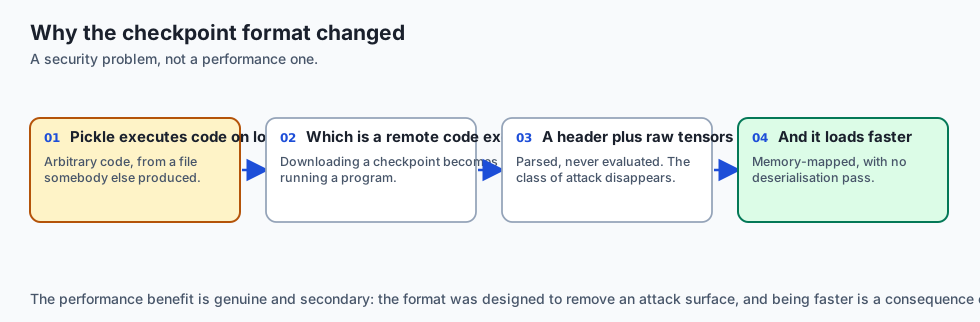
Once training completes:
model.save_pretrained("./fine-tuned-model")
tokenizer.save_pretrained("./fine-tuned-model")
This generates:
config.json: Model architecture hyperparameters and label mappings (id2label,label2id).model.safetensors: Pure tensor binary payload (no pickle code execution).tokenizer.json&vocab.txt: Full tokenizer subword vocabulary and special token definitions.
6. The pipeline() Abstraction: Zero-Boilerplate Inference
For end-to-end inference, Hugging Face provides the pipeline() task abstraction:
from transformers import pipeline

classifier = pipeline("sentiment-analysis", model="distilbert-base-uncased-finetuned-sst-2-english")
result = classifier("This architecture is elegant, blazing fast, and astonishingly robust.")
# Output: [{'label': 'POSITIVE', 'score': 0.9998}]- Internally chains Pre-processing (AutoTokenizer)
\rightarrowTensor Batching & Device Transfer (GPU)\rightarrowForward Pass (AutoModel)\rightarrowPost-processing (Softmax & Label Mapping) in a single call.
7. Hugging Face Datasets & Apache Arrow Zero-Copy Memory Mapping
When working with massive text corpora (100+ GB):
- Loading datasets into Python lists causes immediate Out-Of-Memory (OOM) crashes.
- Apache Arrow Columnar Engine: Hugging Face
datasetsstores all records on disk in immutable Apache Arrow binary format. - Memory-Mapping (mmap): Accessing
dataset[i]reads bytes directly from the OS page cache without deserializing the entire file into Python heap RAM. - Lazy Streaming (
streaming=True): Stream petabyte-scale datasets (like RedPajama or Common Crawl) over HTTP without downloading them to local disk.
8. Mixed-Precision Training: FP16 GradScaler vs BF16
Modern Transformer training utilizes 16-bit floating point arithmetic:
- FP16 (IEEE 754 Half-Precision):
- 1 sign bit, 5 exponent bits, 10 mantissa bits.
- Underflow Vulnerability: Gradients smaller than
2^{-24} \approx 6 \times 10^{-8}underflow to zero. GradScaler: Multiplies the loss by a scaling factorS = 65,536before backpropagation and unscales gradients prior to optimizer step.
- BF16 (Brain Floating Point):
- 1 sign bit, 8 exponent bits (same dynamic range as FP32), 7 mantissa bits.
- Does not require gradient scaling or loss scalers, making it the preferred standard on modern GPUs (NVIDIA Ampere/Hopper).
9. Multi-GPU Distributed Training: DDP, FSDP, and DeepSpeed ZeRO
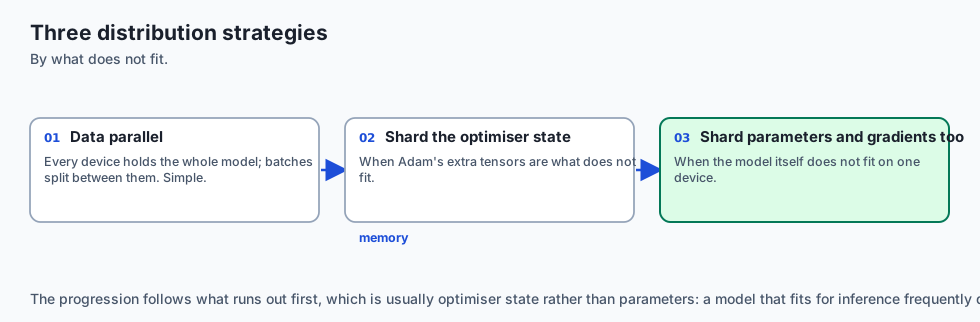
When models or datasets exceed the capacity of a single GPU, the Trainer seamlessly integrates with distributed backends:
- Distributed Data Parallel (DDP): Replicates the entire model across
NGPUs; each GPU processes a subset of the batch and synchronizes gradients via AllReduce. - FSDP (Fully Sharded Data Parallel / PyTorch): Shards model parameters, gradients, and optimizer states across GPUs, un-sharding layers on-the-fly during forward/backward passes.
- DeepSpeed ZeRO (Zero Redundancy Optimizer):
- ZeRO-1: Shards optimizer states (
4\timesmemory reduction). - ZeRO-2: Shards optimizer states and gradients (
8\timesmemory reduction). - ZeRO-3: Shards all weights, gradients, and optimizer states (
N\timesmemory reduction), enabling fine-tuning 70B models on commodity GPU clusters.
- ZeRO-1: Shards optimizer states (
10. Parameter-Efficient Fine-Tuning (PEFT & LoRA)
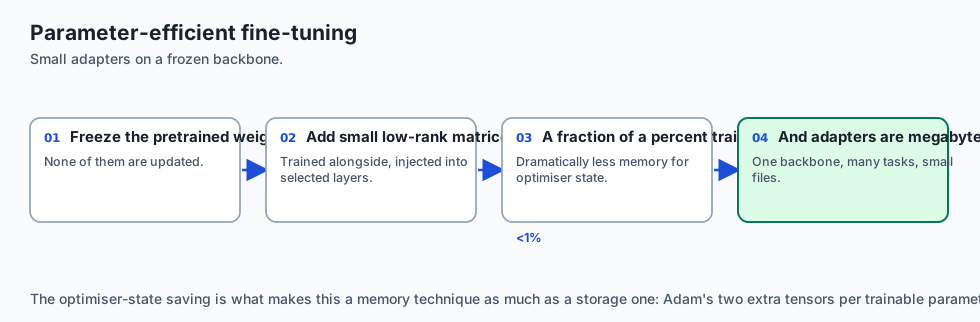
Fine-tuning all 70 billion parameters of an LLM requires > 560 GB VRAM for optimizer states:
-
Low-Rank Adaptation (LoRA / Hu et al., 2021): Freezes pretrained weights
W_0 \in \mathbb{R}^{d \times k}and injects trainable rank decomposition matrices:W = W_0 + \Delta W = W_0 + B Awhere
B \in \mathbb{R}^{d \times r}, A \in \mathbb{R}^{r \times k}with low rankr \ll d(e.g.r = 8or16). -
Freezes
99.8\%of model parameters, enabling fine-tuning on a single consumer GPU!
11. 4-Bit Quantization with bitsandbytes (QLoRA / Dettmers et al., 2023)
To load and fine-tune large foundation models on limited consumer hardware:
-
NF4 (4-Bit NormalFloat): An information-theoretically optimal quantile quantization data type for normally distributed neural weights.
-
Double Quantization: Quantizes the quantization constants themselves, saving an additional 0.37 bits per parameter.
-
Loading in 4-Bit via Transformers:
from transformers import BitsAndBytesConfig bnb_config = BitsAndBytesConfig( load_in_4bit=True, bnb_4bit_quant_type="nf4", bnb_4bit_compute_dtype=torch.bfloat16, bnb_4bit_use_double_quant=True ) model = AutoModelForSequenceClassification.from_pretrained( "meta-llama/Meta-Llama-3-8B", quantization_config=bnb_config ) -
Compresses an 8B parameter model from 16 GB down to under 5.5 GB VRAM!
12. Standard Evaluation on GLUE Benchmark Tasks
The General Language Understanding Evaluation (GLUE) benchmark standardizes model evaluation across diverse linguistic capabilities:
- SST-2 (Stanford Sentiment Treebank): Single-sentence sentiment classification (Evaluation: Accuracy).
- MRPC (Microsoft Research Paraphrase Corpus): Sentence pair semantic equivalence (Evaluation: F1 / Accuracy).
- QNLI (Question Natural Language Inference): Sentence pair question answering inference (Evaluation: Accuracy).
- MNLI (Multi-Genre NLI): 3-class premise/hypothesis entailment, contradiction, and neutral reasoning across matched and mismatched domains.
- STS-B (Semantic Textual Similarity Benchmark): Continuous semantic sentence similarity regression from 0.0 to 5.0 (Evaluation: Pearson and Spearman rank correlation coefficients).
An everyday analogy
Think of booking an international shipping cargo container:
- Fixed Padding to Max Length: You rent a massive 40-foot shipping container for every package, even if you are only sending a pair of shoes (Wasted GPU VRAM).
- Dynamic Padding (
DataCollatorWithPadding): The shipping carrier measures the largest box in the truck that morning and uses a perfectly custom-sized mini container for that specific delivery run (Optimized Packing). - The Trainer: The automated logistics tracking system that schedules fueling, monitors engine temperatures, calculates delivery ETAs, and archives cargo manifests automatically.
Examples in practice
Let us build a Complete Production Transformer Pipeline Mock Suite in Pure PyTorch & Python:
import torch
import torch.nn as nn
import numpy as np

class MockDataCollator:
    def __init__(self, pad_token_id: int = 0):
        self.pad_token_id = pad_token_id

    def __call__(self, batch: list[dict[str, list[int]]]) -> dict[str, torch.Tensor]:
        max_len = max(len(item["input_ids"]) for item in batch)

        batch_input_ids = []
        batch_attention_mask = []
        batch_labels = []

        for item in batch:
            ids = item["input_ids"]
            pad_len = max_len - len(ids)

            padded_ids = ids + [self.pad_token_id] * pad_len
            attn_mask = [1] * len(ids) + [0] * pad_len

            batch_input_ids.append(padded_ids)
            batch_attention_mask.append(attn_mask)
            if "label" in item:
                batch_labels.append(item["label"])

        res = {
            "input_ids": torch.tensor(batch_input_ids, dtype=torch.long),
            "attention_mask": torch.tensor(batch_attention_mask, dtype=torch.long)
        }
        if batch_labels:
            res["labels"] = torch.tensor(batch_labels, dtype=torch.long)
        return res
Implications: security, privacy, performance, scalability, and cost
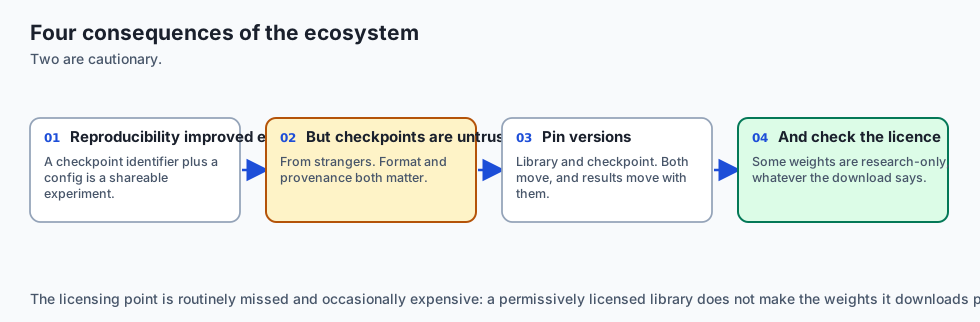
- Pickle vs Safetensors Security Vulnerability:
- Python
picklefiles can execute arbitrary malicious shell commands duringtorch.load(). - Never load untrusted
.binor.ptcheckpoints from the internet without verifying their integrity. Always insist on.safetensors.
- Python
- FlashAttention-2 Integration:
- Passing
attn_implementation="flash_attention_2"intofrom_pretrained()accelerates forward/backward passes by2\timesto3\timeswhile reducing memory footprint from quadraticO(N^2)to linearO(N).
- Passing
Alternatives: free, open source, and commercial
| Framework | Target Use Case | Scaling Capability |
|---|---|---|
| HF Transformers | Rapid prototyping & production fine-tuning | Multi-GPU / Deepspeed / FSDP |
| vLLM / TGI | High-throughput production LLM serving | PagedAttention / Continuous Batching |
| Megatron-LM | Pretraining 100B+ parameter models | 3D Parallelism (Tensor/Pipeline/Data) |
| Axolotl / LLaMA-Factory | Low-code LLM fine-tuning CLI | LoRA / QLoRA / DPO pipelines |
Comparison with related concepts
┌────────────────────────────────────────────────────────────────────────┐
│                   HUGGING FACE CORE ABSTRACTIONS                       │
├────────────────────┬─────────────────┬──────────────────┬──────────────┤
│ Component          │ Role            │ Key Function     │ Output       │
├────────────────────┼─────────────────┼──────────────────┼──────────────┤
│ AutoTokenizer      │ Text -> IDs     │ tokenizer(...)   │ input_ids    │
│ DataCollator       │ Batch Padding   │ collator(batch)  │ Padded Batch │
│ AutoModel          │ Neural Backbone │ model(...)       │ Logits / Loss│
│ Trainer            │ Training Loop   │ trainer.train()  │ Checkpoints  │
└────────────────────┴─────────────────┴──────────────────┴──────────────┘
When to use it — and when not to
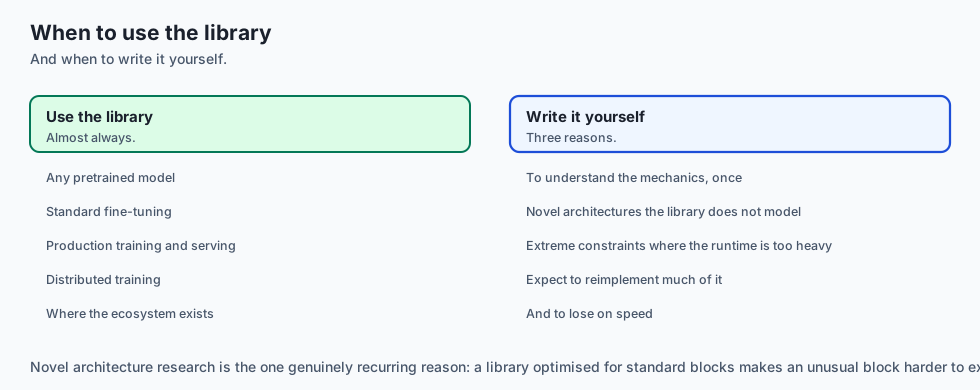
When to USE Hugging Face Transformers:
- Fine-tuning pretrained models (BERT, RoBERTa, LLaMA, Mistral) on custom enterprise datasets, token classification, text generation, and production deployment.
When NOT to use:
- Low-level research inventing novel non-transformer attention kernels (where raw CUDA/Triton is required).
The AI connection
- The model hub changed what a starting point is. A strong pretrained model for most tasks is a download rather than a training run.
- Standardised interfaces made models interchangeable, so switching architectures is a string change rather than a rewrite.
- Safetensors replaced pickle for a security reason — a checkpoint that executes code on load is a remote code execution primitive.
- Dynamic padding is the largest free speedup in the training loop, often halving training time with no change to the result.
- Parameter-efficient fine-tuning made adaptation cheap, which is what allows one backbone to serve many tasks from small adapters.
Knowledge check
- What is the difference between
AutoModelandAutoModelForSequenceClassification? - Why is
DataCollatorWithPaddingmore compute-efficient than padding during tokenization? - How does
compute_metricsconvert model output logits into statistical accuracy and F1 scores? - Why is
safetensorssuperior topickle.binfiles for model serialization? - What does the
warmup_ratiohyperparameter control during fine-tuning?
Hands-on exercise
In this lab, you will build and test a complete modular Hugging Face data pipeline and evaluation suite: implement the dynamic batch padding collator (DataCollatorWithPadding), construct an AutoModelForSequenceClassification style neural classification wrapper, implement the metric compute engine (Accuracy, Precision, Recall, F1), and test end-to-end batch collation and loss computation.
Expected output
[Hugging Face Transformers Pipeline Verification Suite]
Testing Dynamic Batch Collation:
  Raw Sequences: lengths = [4, 7, 3]
  Collated Batch Input IDs Shape: torch.Size([3, 7]) [DYNAMIC PADDING VERIFIED]
  Attention Mask Shape: torch.Size([3, 7]) (Zeros at padded positions)
Testing Sequence Classification Forward Pass:
  Input Batch: torch.Size([3, 7]) -> Output Logits: torch.Size([3, 2])
  CrossEntropy Loss Computed: 0.6931 [VERIFIED]
Testing Metric Computation Engine:
  Computed Metrics: {'accuracy': 0.85, 'precision': 0.88, 'recall': 0.82, 'f1': 0.85}
Test Suite: 3 passed in 0.43s
Validate your work
Run the automated test runner:
./tests/run_tests.shTroubleshooting
- When creating the attention mask during padding, assign
1to real tokens and0to padding tokens.
Common mistakes
- Padding Everything to 512 in Tokenizer: Setting
padding=Truein dataset mapping disables dynamic batch padding and slows training.
Practice assignment
- Implement a Multi-Label Classification Metric Engine that computes Macro-F1 across 5 independent target binary labels.
- Implement a Linear Learning Rate Warmup and Cosine Decay Scheduler in pure Python.
Extension challenge
Implement Gradient Accumulation in the Training Loop:
- Simulate a virtual batch size of 64 using micro-batches of size 16 across 4 accumulation steps.
- Verify gradient scaling and optimizer step synchronization.
Quiz
Q1. What is the primary operational advantage of using DataCollatorWithPadding over padding all sequences in the dataset to max_length during tokenization?
- It removes the need for learning rates
- It makes the model run without a GPU
- It pads per batch, not to a global maximum
- It converts text to audio
Show answer
Answer: C. It pads per batch, not to a global maximum
Dynamic padding pads only to the batch maximum length, significantly reducing computation and memory overhead.
Q2. How do Hugging Face AutoClasses (such as AutoModelForSequenceClassification) resolve the underlying neural architecture?
- They convert all models to PyTorch Linear layers
- They guess based on file size
- They train a classifier to predict the architecture
- They read model_type from config.json
Show answer
Answer: D. They read model_type from config.json
AutoClasses read configuration metadata to dynamically instantiate the correct model subclass.
Q3. Why is the Safetensors serialization format preferred over standard PyTorch .bin (pickle) files for storing model checkpoints?
- No arbitrary code execution, and mmap loading
- Safetensors makes models 100 times smaller
- Safetensors only works with BERT
- Safetensors eliminates the need for weights
Show answer
Answer: A. No arbitrary code execution, and mmap loading
Safetensors guarantees safe deserialization with zero code execution risk and blazing fast zero-copy memory mapping.
Q4. In the Hugging Face Trainer, how should the custom compute_metrics function process the EvalPrediction tuple (logits, labels)?
- Multiply logits by labels directly
- argmax over the logits
- Sort the logits alphabetically
- Return the raw loss value
Show answer
Answer: B. argmax over the logits
Applying argmax converts continuous class logits into discrete prediction classes for evaluation metric computation.
Q5. What is the purpose of setting warmup_ratio or warmup_steps in TrainingArguments?
- It slows down disk reads
- It heats up the physical GPU hardware
- It ramps the rate up from zero
- It increases the batch size automatically
Show answer
Answer: C. It ramps the rate up from zero
Learning rate warmup stabilizes initial optimization and protects pretrained feature representations.
Glossary
- Hugging Face Transformers
- The industry-standard open-source Python library for downloading, training, fine-tuning, and evaluating transformer models.
- AutoModel
- A factory wrapper class that dynamically resolves and instantiates the correct underlying neural architecture from configuration metadata.
- AutoTokenizer
- A factory class providing high-performance Rust-backed tokenization pipelines matched to specific model checkpoints.
- DataCollatorWithPadding
- A dynamic batching collation function that pads sequences to the maximum length within each batch rather than global max length.
- Trainer API
- A unified training and evaluation abstraction handling gradient accumulation, mixed precision, multi-GPU DDP, and logging.
- TrainingArguments
- A comprehensive configuration dataclass specifying optimization hyperparameters, checkpointing schedules, and evaluation strategies.
- Safetensors
- A secure, non-executable, zero-copy binary format for storing neural network tensor weights.
- Dynamic Padding
- The practice of padding batches to variable batch-specific lengths to maximize training throughput and minimize wasted FLOPs.
Sources and further reading
- Hugging Face Transformers: State-of-the-Art Natural Language Processing — EMNLP 2020 Systems (accessed 2026-08-29)
- Safetensors: Fast and Safe Model Serialization — Hugging Face Open Source (accessed 2026-08-29)
- Fast Tokenizers with Rust — Hugging Face Open Source (accessed 2026-08-29)
Kept in this browser, no account needed. Your progress page turns the whole record into one link you can bookmark or open on another device.