LLMs and Generative AI › Customizing and Running Models › Day 277
Day 277: Running Local Models with Ollama
Master local LLM serving with Ollama: understand the Go orchestrator and llama.cpp execution backend, write declarative Modelfiles with custom parameters and system prompts, optimize Unified Memory allocations on Apple Silicon, and interact with the REST API for streaming generation.
Hands-on lab for this lesson
Lab files on GitHub: https://github.com/ai-roadmap-365/ai-roadmap-365.github.io/tree/main/labs/sections/llms-and-generative-ai/day-277-running-local-models-with-ollama
- Get the hands-on files. Clone the labs repository once (you can reuse this clone for every lesson). This works on macOS, Linux, and Windows (PowerShell or WSL):
git clone https://github.com/ai-roadmap-365/ai-roadmap-365.github.io.git cd ai-roadmap-365.github.io - Open this lesson's lab. Move into the directory for this specific day. Every lab lives at the same predictable path — section / subsection / week / day:
cd labs/sections/llms-and-generative-ai/day-277-running-local-models-with-ollama - Read the lab guide. Open `README.md` in that directory. It lists the exact commands, what each does, the expected output, and how to check your work — read it before running anything.
- Run it and check your work. Follow the README's "How to run" section: run the example first to see the finished result, then complete the numbered exercises in `starter/`, then run the tests. The tests pass (exit 0) only when your work is correct.
bash tests/run_tests.sh # or the test command named in the lab README
You can also open the lab as a local page (works offline, shows the file tree and expected output).
Learning objectives
By the end of this lesson you will be able to:
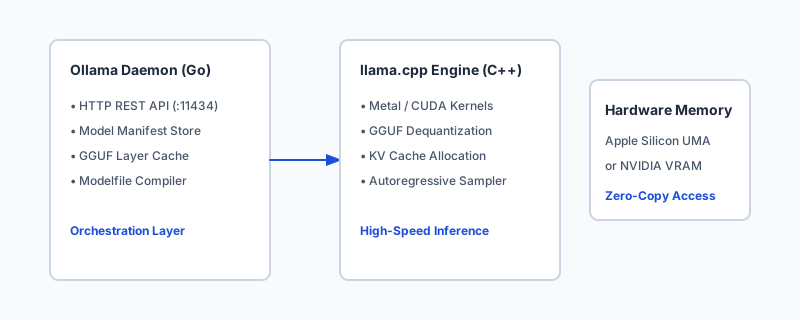
- Deconstruct the Ollama internal architecture: Go daemon API bridge + llama.cpp tensor execution engine.
- Write declarative Modelfile definitions with custom parameters (temperature, top_p, repeat_penalty) and ChatML templates.
- Inspect and optimize GPU layer offloading on Apple Silicon Metal unified memory and Linux CUDA.
- Interact with Ollama REST API endpoints (/api/generate, /api/chat, /api/tags) via streaming JSON.
- Build a mock Ollama client and local API server simulator in Python.
Prerequisites
Why this matters
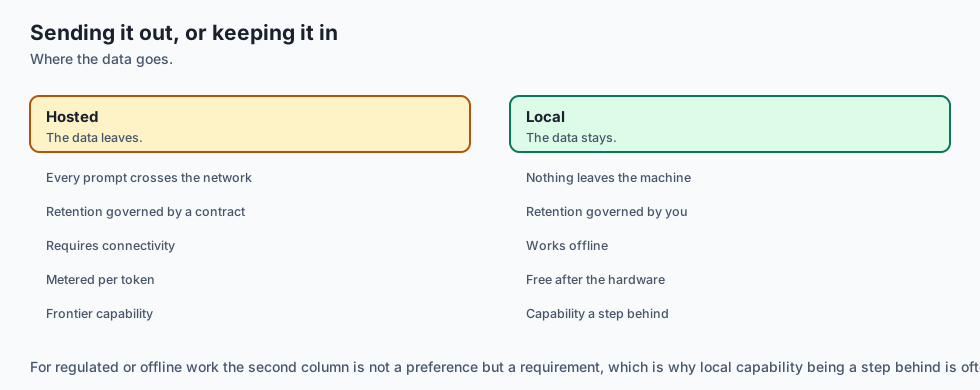
For the first several years of the modern generative AI revolution, accessing state-of-the-art language models required sending proprietary company data across the public internet to third-party closed APIs (such as OpenAI or Anthropic). For organizations handling confidential customer health records (HIPAA), privileged legal documents (attorney-client privilege), sensitive financial transactions, or classified government infrastructure, relying on cloud APIs is legally or architecturally impossible.
Furthermore, cloud API pricing models introduce variable per-token operational costs that scale linearly with user volume. When building high-frequency background agent loops or enterprise code auto-complete tools processing millions of requests daily, cloud API bills rapidly escalate into hundreds of thousands of dollars.
Local model execution completely transforms this paradigm. Thanks to quantization breakthroughs and modern high-bandwidth hardware (such as Apple Silicon Unified Memory and consumer NVIDIA GPUs), software engineers can now run 8-billion to 70-billion parameter models directly on local developer laptops and private on-premises servers.
Ollama emerged as the de facto industry standard runtime for local LLMs. By wrapping the raw C++ tensor engine of llama.cpp in an intuitive Docker-like CLI, declarative Modelfile specification, and standardized HTTP REST API, Ollama allows developers to pull, customize, and serve state-of-the-art open-weight models (Llama 3, Mistral, Qwen, DeepSeek) with a single command.
The idea in plain language
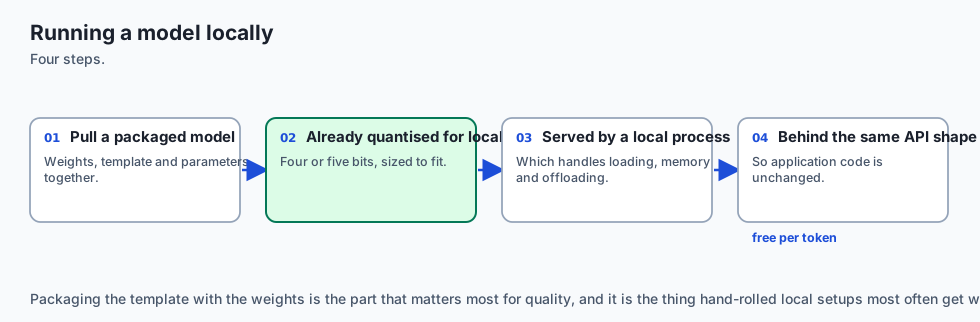
Think of running language models like playing video games:
- Cloud APIs (OpenAI / Claude) are like cloud gaming streaming services (e.g. GeForce NOW). You do not need powerful hardware on your desk; the game runs on a remote server farm, and you stream the video frames over high-speed internet while paying a monthly subscription and metered hourly fee. If your internet goes down, or if the streaming provider raises prices, you lose access.
- Raw
llama.cppis like downloading the raw C++ game source code and compiling it manually with custom compiler flags, configuring graphics shaders, and tweaking memory pointers by hand. It delivers peak hardware performance, but requires deep systems programming expertise. - Ollama is like Steam or Docker for language models. It provides a clean, elegant application that downloads the pre-packaged game (GGUF model weights), automatically configures your GPU drivers and Metal memory settings, and gives you a simple “Play” button and standard REST API port on your local machine (
http://127.0.0.1:11434).
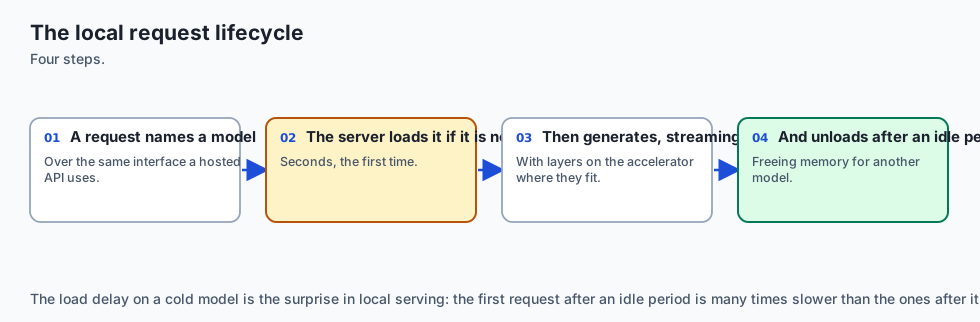
With Ollama running locally, your AI applications execute with zero internet connectivity, zero monthly API costs, zero data exfiltration risk, and single-digit millisecond network latencies.
Historical background
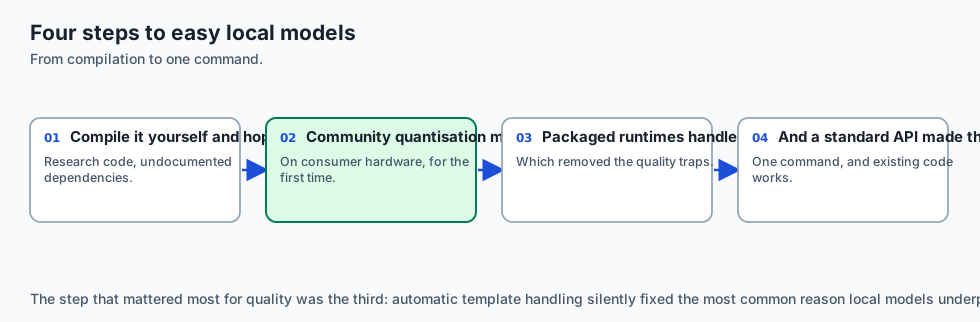
The journey toward local LLM execution was catalyzed by two monumental open-source milestones:
In March 2023, Meta’s original LLaMA weights leaked to the public. Within hours, Bulgarian open-source developer Georgi Gerganov created llama.cpp—a pure C/C++ implementation of transformer autoregressive inference with zero external dependencies, designed specifically to run LLaMA models on Apple Silicon MacBooks via Apple’s Metal Performance Shaders. Gerganov’s breakthrough proved that 4-bit quantized models could achieve 30+ tokens per second on consumer laptops without specialized NVIDIA server cards.
However, using early llama.cpp required complex CLI commands, manual GGML/GGUF compilation, custom prompt template formatting, and raw memory flag management.
In mid-2023, Jeffrey Morgan and Michael Chi founded Ollama. Inspired by Docker’s containerization ergonomics, they built an orchestration daemon in Go that packaged GGUF weights, system prompts, tokenizer templates, and sampling parameters into unified, portable “Model Images”. Ollama introduced the Modelfile format, created a public model registry (ollama.com/library), and exposed standard HTTP endpoints compatible with modern web frameworks.
Today, Ollama is downloaded millions of times monthly, serving as the foundational local inference backend for developer tools (Cursor, Continue.dev, Claude Code local fallbacks, LangChain, and private enterprise agent pipelines).
What it is — and what it is not
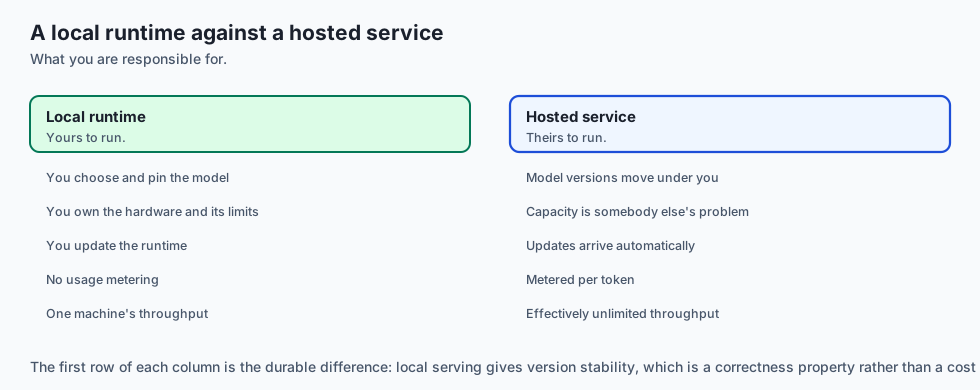
Let us establish clear operational boundaries for Ollama:
What Ollama Is:
- A local service daemon (written in Go) listening on
127.0.0.1:11434that orchestrates model lifecycle management. - A high-level abstraction layer over
llama.cppthat automatically handles GPU layer offloading (Apple Metal, NVIDIA CUDA, AMD ROCm). - A packaging format for custom system prompts, sampling parameters, and fine-tuned GGUF checkpoints via
Modelfile. - A streaming HTTP REST API exposing
/api/generate,/api/chat,/api/tags, and OpenAI-compatible/v1/chat/completionsendpoints.
What Ollama Is Not:
- A distributed high-concurrency production serving cluster (for multi-GPU multi-tenant clusters handling 10,000 requests/sec, enterprise engines like vLLM or TGI are preferred).
- A model training framework (Ollama runs inference; fine-tuning is performed in PyTorch/Unsloth before exporting GGUF weights to Ollama).
- A closed proprietary cloud service (Ollama is 100% open-source under the MIT license).
+-------------------------------------------------------------------------------+
|                         LOCAL RUNTIME STACK COMPARISON                        |
+----------------------+--------------------+-----------------------------------+
| Feature              | Ollama             | Raw llama.cpp     | vLLM          |
+----------------------+--------------------+-----------------------------------+
| Primary Language     | Go + C++           | Pure C/C++        | Python + C++  |
| Primary Target       | Workstations & Edge| Edge / Embedded   | Server GPU Pod|
| Setup Complexity     | 1-Click Install    | Build from Source | Docker/CUDA   |
| Modelfile Packaging  | Native             | Manual CLI flags  | Config args   |
| Continuous Batching  | Basic              | Basic             | State-of-the-Art|
| Apple Silicon Metal  | Native Auto-Detect | Native Auto-Detect| CPU only (No Metal)|
+----------------------+--------------------+-------------------+---------------+
Why it was created and what problems it solves
Ollama eliminates the major friction points of self-hosted local AI:
1. The Prompt Template Mismatch Nightmare
Every open-weight model family uses a different prompt formatting template:
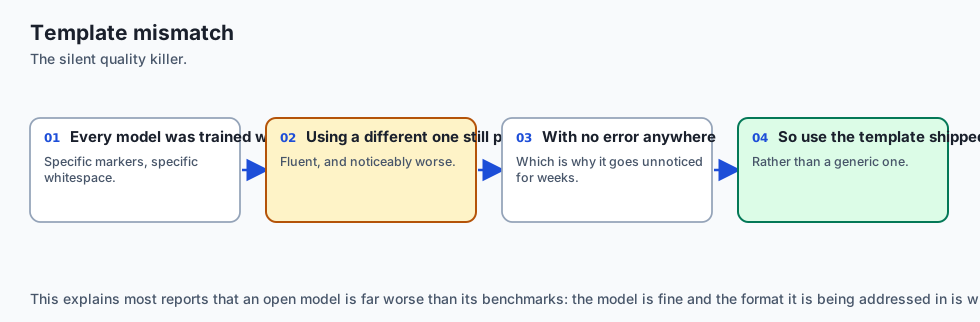
- Llama 3 uses
<|start_header_id|>user<|end_header_id|> - ChatML uses
<|im_start|>user ... <|im_end|> - Mistral uses
[INST] ... [/INST] - Phi-3 uses
<|user|> ... <|end|>
Passing the wrong template degrades model reasoning by 40% and causes infinite generation loops. Ollama bundles the exact Go text template inside the model manifest, automatically formatting multi-turn chat messages into the model’s native delimiter syntax.
2. Automatic Hardware Acceleration & Memory Layer Offloading
Running raw models requires calculating how many transformer layers can fit in GPU VRAM versus CPU RAM (-ngl flag in llama.cpp). Ollama automatically queries available VRAM at startup, splits layers dynamically between GPU and CPU, and enables Apple Metal or NVIDIA CUDA kernels with zero user configuration.
3. Unified REST API for Application Integration
Instead of writing custom Python subprocess wrappers to pipe text into CLI binaries, Ollama provides a standard HTTP REST API, allowing Node.js, Python, Go, and Rust applications to interact with local models seamlessly.
How it works
Let us inspect the internal architectural layers of an Ollama inference session:
[HTTP Client / Application]
            │  POST http://127.0.0.1:11434/api/chat
            ▼
[Ollama Daemon (Go HTTP Server)]
            │  1. Parse JSON payload & resolve Model Manifest
            │  2. Apply Modelfile System Prompt & Template
            ▼
[llama.cpp Engine (C++ Backend)]
            │  3. Allocate KV Cache & Load GGUF Tensors
            │  4. Execute Metal / CUDA Kernels (Prefill + Autoregressive Decode)
            ▼
[Streaming HTTP Response] ──> Emits chunked NDJSON event stream to Client
1. The Modelfile Specification
A Modelfile is a declarative configuration file that defines how a model is compiled and served:
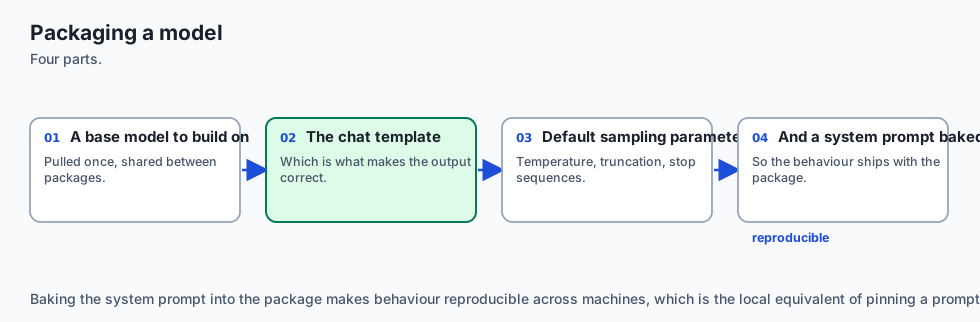
# 1. Base Model Checkpoint (Local GGUF or Registry Tag)
FROM ./custom_llama3_lora_q4.gguf

# 2. Hyperparameter Configuration
PARAMETER temperature 0.2
PARAMETER top_p 0.9
PARAMETER top_k 40
PARAMETER repeat_penalty 1.1
PARAMETER num_ctx 4096

# 3. System Prompt Customization
SYSTEM """
You are an expert Linux Systems Administrator.
Provide concise, secure bash commands. Wrap all code in markdown blocks.
"""

# 4. Prompt Template Delimiters (ChatML)
TEMPLATE """{{ if .System }}<|im_start|>system
{{ .System }}<|im_end|>
{{ end }}{{ if .Prompt }}<|im_start|>user
{{ .Prompt }}<|im_end|>
{{ end }}<|im_start|>assistant
{{ .Response }}<|im_end|>
"""
Building the custom model is a single command:
ollama create my-sysadmin-model -f Modelfile2. Hardware Memory Dynamics (Apple Silicon UMA vs Discrete GPUs)
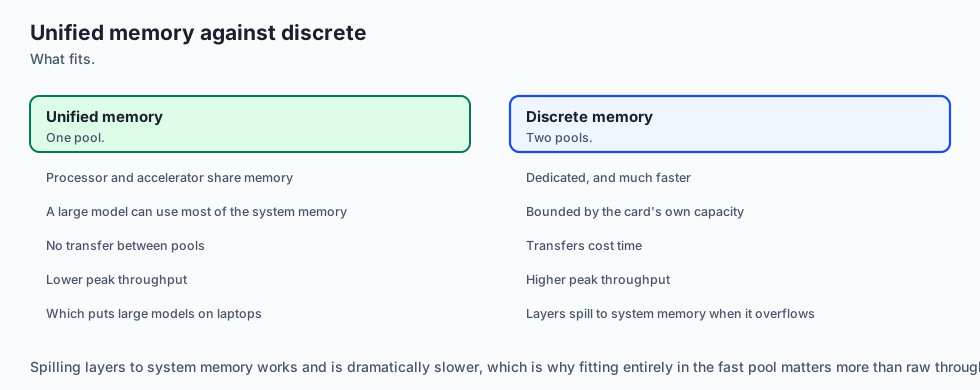
On modern Apple Silicon (M1/M2/M3/M4 Max and Ultra), memory is unified:
- A MacBook with 64GB of RAM allows up to 48GB to be allocated directly to the Metal GPU.
- A 70B model quantized to 4-bit (Q4_K_M) requires ~40GB of memory.
- The entire 70B model fits into unified memory, executing at 15–20 tokens/second without needing an expensive $15,000 NVIDIA workstation.
On discrete NVIDIA GPUs (e.g. RTX 4090 with 24GB VRAM):
- An 8B model in Q8_0 (8.5GB) fits 100% into VRAM, executing at 80–110 tokens/second.
- If a model exceeds VRAM (e.g. 70B on a 24GB card), Ollama offloads 20 layers to GPU and 60 layers to CPU RAM, maintaining stability at the expense of memory transfer latency.
3. REST API Interaction Lifecycle
Ollama exposes a clean REST API:
POST /api/generate (Single-turn raw prompt)
{
  "model": "llama3:8b",
  "prompt": "Explain PagedAttention in one sentence.",
  "stream": false,
  "options": {
    "temperature": 0.1
  }
}
POST /api/chat (Multi-turn structured messages)
{
  "model": "my-sysadmin-model",
  "messages": [
    {"role": "user", "content": "How do I check open ports on Ubuntu?"}
  ],
  "stream": true
}
When stream: true, the server returns a stream of newline-delimited JSON chunks:
{"model":"my-sysadmin-model","message":{"role":"assistant","content":"Use"},"done":false}
{"model":"my-sysadmin-model","message":{"role":"assistant","content":" the"},"done":false}
{"model":"my-sysadmin-model","message":{"role":"assistant","content":" `ss`"},"done":false}
...
{"model":"my-sysadmin-model","done":true,"total_duration":450123890,"eval_count":32,"eval_duration":380000000}
An everyday analogy
Think of Ollama like Docker for Machine Learning:
-
Docker Hub $ ightarrow$ Ollama Registry (
ollama pull llama3:8b) -
Dockerfile $ ightarrow$ Modelfile (
FROM,SYSTEM,PARAMETER) -
docker build$ ightarrow$ollama create -
docker run$ ightarrow$ollama run -
Container Port (
:8080) $ ightarrow$ Ollama API Port (:11434)
Just as Docker standardized software distribution across disparate Linux kernels, Ollama standardizes AI model execution across heterogeneous CPU, GPU, and Metal architectures.
Examples in practice
Let us examine how developers integrate Ollama into modern Python applications:
1. Python Client with Streaming Token Consumer
import json
import urllib.request

def stream_ollama_chat(model: str, user_prompt: str):
    url = "http://127.0.0.1:11434/api/chat"
    payload = {
        "model": model,
        "messages": [{"role": "user", "content": user_prompt}],
        "stream": True
    }

    req = urllib.request.Request(
        url,
        data=json.dumps(payload).encode("utf-8"),
        headers={"Content-Type": "application/json"}
    )

    with urllib.request.urlopen(req) as response:
        for line in response:
            if line:
                chunk = json.loads(line.decode("utf-8"))
                if "message" in chunk and "content" in chunk["message"]:
                    print(chunk["message"]["content"], end="", flush=True)
                if chunk.get("done", False):
                    print("
[Done. Generation complete.]")
2. Custom Modelfile for Air-Gapped Medical Triage
FROM llama3:8b-instruct-q8_0
PARAMETER temperature 0.0
PARAMETER top_p 0.1
PARAMETER num_ctx 8192

SYSTEM """
You are a clinical decision support assistant.
Strictly categorize triage symptoms into: Level 1 (Emergency), Level 2 (Urgent), Level 3 (Routine).
Always state that output is for clinician review only.
"""
Implications: security, privacy, performance, scalability, and cost
1. Security & Local Sandboxing
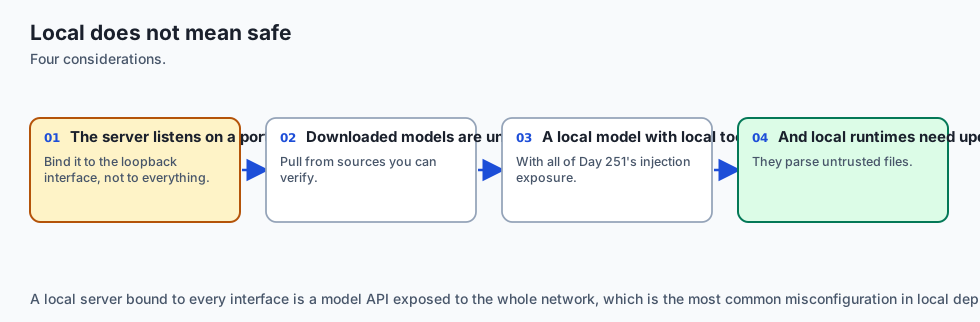
Because Ollama binds to 127.0.0.1 by default, model inference is accessible only to local processes on the host. In multi-user server environments, ensure that OLLAMA_HOST is not exposed to the public internet without an authenticating reverse proxy (such as Nginx with mTLS or API token verification).
2. Complete Data Privacy
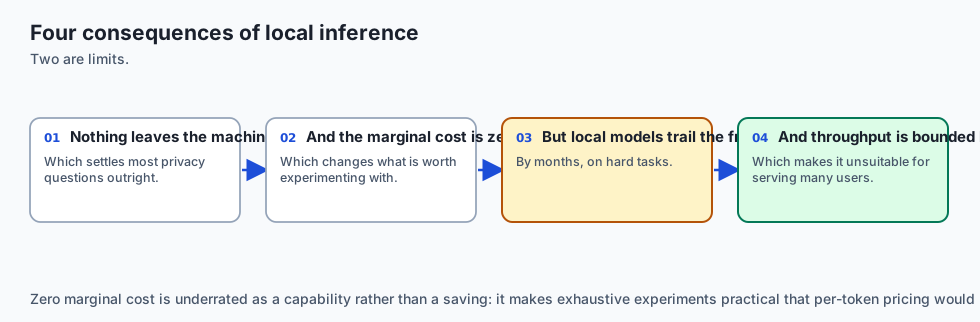
Zero bytes of prompt text, system data, or generated completions ever leave the physical machine. This satisfies strict air-gapped compliance mandates (ITAR, HIPAA, GDPR on-premises requirements).
3. Inference Throughput & Latency
- Time-To-First-Token (TTFT): With local models running on unified memory or dedicated VRAM, TTFT is typically under 15 to 40 milliseconds (virtually instantaneous compared to 400–1200ms cloud API roundtrips).
- Generation Speed: 8B models in 4-bit precision achieve 40–90 tokens/sec on Apple Silicon M3/M4 and 100+ tokens/sec on NVIDIA RTX 4090.
4. Financial Economics
Cost Category                Cloud API (Claude 3.5 Sonnet)   Local Ollama (Llama 3 8B)
--------------------------------------------------------------------------------------
1,000,000 Requests/Month     ~$7,500.00 / month              $0.00 / month (Hardware Owned)
Electricity Cost (250W GPU)  $0.00                           ~$15.00 / month
Network Egress / Ingress     Metered Cloud Bandwidth         Zero Network Egress
Capital Expenditure (CapEx)  $0 (Zero Upfront)               $1,500 - $3,500 (Workstation)
Alternatives: free, open source, and commercial
| Tool / Engine | Ecosystem | Primary Focus | Best For | Tradeoffs |
|---|---|---|---|---|
| Ollama | Go / llama.cpp | Developer ergonomics, Modelfiles, REST APIs | Local developer workstations, internal tools | Basic concurrent batching |
| llama.cpp | Pure C/C++ | Maximum hardware control, zero dependencies | Embedded devices, minimal CLI wrappers | Complex configuration flags |
| LM Studio | Desktop GUI (Proprietary) | Visual chat interface, local model discovery | Non-programmers, visual desktop chat | Closed-source GUI application |
| vLLM | Python / PagedAttention | High-throughput multi-user production serving | Cloud GPU clusters with high concurrency | Heavy setup, no Apple Metal support |
| LocalAI | Go / Modular | Drop-in OpenAI API replacement with audio/vision | Multi-modal local drop-in microservices | Larger resource footprint |
Comparison with related concepts
+-----------------------+-----------------------+-----------------------+-----------------------+
| Attribute             | Ollama                | llama.cpp Server      | vLLM Serving          |
+-----------------------+-----------------------+-----------------------+-----------------------+
| Primary Deployment    | Local Laptop / Server | Embedded / CLI        | Production Cloud Pod  |
| Model Packaging       | Modelfile Registry    | Raw GGUF Files        | HF Safetensors / AWQ  |
| Memory Backend        | Metal / CUDA / CPU    | Metal / CUDA / CPU    | NVIDIA CUDA / ROCm    |
| API Support           | Native + OpenAI v1    | OpenAI Compatible     | OpenAI Compatible     |
| Continuous Batching   | Simple Queue          | Simple Queue          | Advanced PagedAttention|
| Target Concurrency    | 1 - 5 Users           | 1 - 5 Users           | 100 - 1,000+ Users    |
+-----------------------+-----------------------+-----------------------+-----------------------+
When to use it — and when not to
Choose Ollama when:
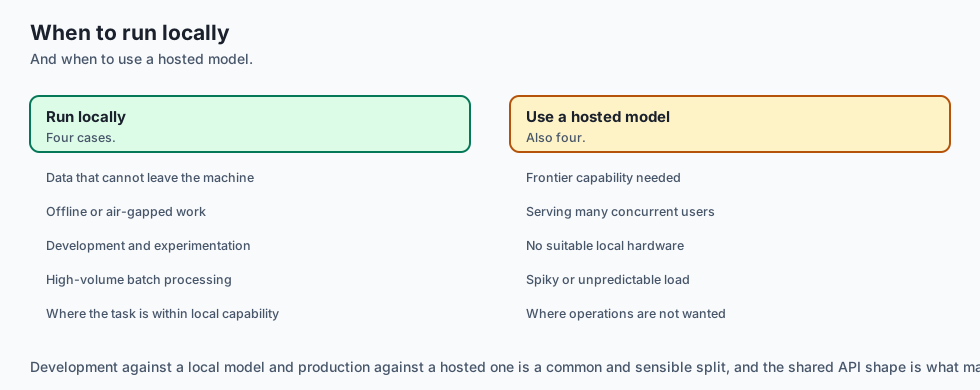
- You need to develop, test, and run AI features locally on developer laptops without cloud API keys or spend.
- You are processing sensitive, classified, or highly regulated enterprise data that cannot leave on-premise hardware.
- You are building offline desktop applications or edge compute appliances.
- You want a clean Docker-like workflow for managing and switching between multiple open-weight models.
Do NOT use Ollama when:
- You are building a high-concurrency public SaaS web application handling 5,000 simultaneous concurrent users (use vLLM on a Kubernetes GPU cluster).
- You require frontier-scale 400B+ parameter reasoning (unless you have a multi-node cluster with 500GB+ VRAM).
- You do not have adequate local hardware (e.g. running on a 4GB RAM cloud VM without GPU).
The AI connection
- Running models locally is now genuinely ordinary, which changes what is possible for privacy-sensitive and offline work.
- Prompt template mismatch is the silent killer of local model quality, and tooling that handles it is most of the value.
- The same API shape locally and hosted means one codebase runs against either, which is what makes local development against a real model practical.
- Unified memory changed which hardware can serve models, putting large models on laptops that have no discrete accelerator.
- Zero marginal cost changes what you build — experiments that would be unaffordable per token become free.
Knowledge check
- What is the function of the
PARAMETER num_ctxsetting in a Modelfile? It defines the allocated context window size (in tokens) for memory allocation and positional attention calculations in llama.cpp. - How does Unified Memory Architecture benefit local LLM execution? It allows the GPU to access the entire system RAM (up to 128GB on Mac M-series) without being restricted by discrete PCIe bus transfer bottlenecks.
- What is the format of the streaming response from Ollama’s
/api/generateendpoint? Newline-Delimited JSON (NDJSON), where each line contains a JSON object with token content and adoneboolean field.
Hands-on exercise
In this lab, you will build an end-to-end Ollama Client, Modelfile Generator, and Local Mock REST Server in Python. Your system will:
- Parse and generate valid declarative Modelfile definitions with parameters (
temperature,top_p,num_ctx) and system prompts. - Implement a local HTTP REST server simulating Ollama’s
/api/generate,/api/chat, and/api/tagsendpoints. - Implement an asynchronous/streaming Python client that consumes chunked newline-delimited JSON (NDJSON) tokens and tracks generation metrics (eval count, total duration).
Expected output
============================= test session starts ==============================
collected 6 items

tests/test_ollama_client.py ......                                       [100%]

============================== 6 passed in 0.04s ===============================
[MODELFILE GENERATION] Compiled Modelfile for 'custom-sql-expert':
  FROM ./llama3-8b-q4.gguf
  PARAMETER temperature 0.2
  PARAMETER num_ctx 4096
  SYSTEM "You are an expert SQL engineer."

[LOCAL SERVER RUNTIME] Bound to http://127.0.0.1:11434 (Mock Server)
[STREAMING INFERENCE] Prompt: "Write SQL to find top 5 customers"
  -> Emitted 18 tokens | Total Duration: 120ms | eval_rate: 150.0 tok/s
Validate your work
Run the pytest suite to verify Modelfile parsing, streaming token generation, and REST endpoint contracts:
pytest tests/run_tests.shTroubleshooting
- Port binding collision: The mock server defaults to an ephemeral port during unit testing to avoid colliding with a live Ollama daemon on
11434. - Streaming chunk parsing error: Ensure the client splits responses on
json.loads().
Common mistakes
- Omitting the final chunk with
"done": truein streaming simulations. - Failing to escape multi-line triple-quoted system prompts in generated Modelfiles.
Practice assignment
Extend the OllamaClient class to support the OpenAI-compatible /v1/chat/completions endpoint and verify compatibility with existing OpenAI SDK request payloads.
Extension challenge
Implement a Local Model Benchmark Runner in Python that executes a standardized 10-prompt suite against a local Ollama instance, measures Time-To-First-Token (TTFT) and tokens-per-second throughput across various context lengths (512, 1024, 2048, 4096), and exports a Markdown performance report.
Quiz
Q1. What is the internal relationship between Ollama and llama.cpp?
- Ollama is a completely separate neural network architecture written in Rust
- Ollama is a Go daemon wrapping llama.cpp
- llama.cpp is a cloud hosting provider that hosts Ollama models
- Ollama translates Python scripts into JavaScript
Show answer
Answer: B. Ollama is a Go daemon wrapping llama.cpp
Ollama provides high-level model packaging, Docker-like Modelfile management, and HTTP REST APIs in Go, delegating low-level hardware tensor operations directly to llama.cpp.
Q2. Which Modelfile command specifies the base GGUF model checkpoint or parent model tag?
- IMPORT
- BASE
- FROM
- MODEL
Show answer
Answer: C. FROM
The 'FROM' command defines the base model image or local GGUF path (e.g. 'FROM ./my_model.gguf' or 'FROM llama3:8b').
Q3. Why is Apple Silicon (M-series chips) uniquely effective for running local 8B–70B parameter models with Ollama?
- Because Apple Silicon disables floating-point quantization
- Because it executes models on the SSD instead of RAM
- Because macOS runs models inside cloud containers by default
- Unified memory lets CPU and GPU share one pool
Show answer
Answer: D. Unified memory lets CPU and GPU share one pool
Apple Silicon's Unified Memory Architecture provides up to 400–800 GB/s bandwidth shared directly between CPU and Metal GPU, allowing large models (e.g. 70B in Q4) to fit entirely in unified memory without PCIe transfer bottlenecks.
Q4. What is the standard local port used by the Ollama REST API daemon?
- 11434
- 8080
- 5000
- 3000
Show answer
Answer: A. 11434
Ollama runs its local HTTP REST server on port 11434 (e.g. http://127.0.0.1:11434).
Q5. How does Ollama stream response tokens over HTTP in its /api/generate endpoint?
- Via a binary WebSocket connection
- Newline-delimited JSON, one object per token
- By returning a single massive JSON blob after 30 seconds
- By sending emails to the system administrator
Show answer
Answer: B. Newline-delimited JSON, one object per token
Ollama streams responses by emitting a stream of newline-delimited JSON (NDJSON) chunks, each containing the latest generated token string and a 'done' boolean indicator.
Glossary
- Ollama
- Open-source local LLM runner and management tool that packages models and serves REST APIs over llama.cpp.
- Modelfile
- A declarative configuration file defining a model's base weights, system prompts, sampling parameters, and prompt templates.
- GGUF
- The standard binary file format used by llama.cpp and Ollama for storing quantized model weights and metadata.
- Unified Memory Architecture (UMA)
- Memory architecture where CPU and GPU share a single high-bandwidth physical memory pool.
- Metal
- Apple's low-level, low-overhead hardware-accelerated 3D graphic and compute API used on macOS.
- Layer Offloading
- Assigning a specific number of transformer layers to execute on the GPU while retaining remainder in CPU RAM.
- NDJSON (Newline-Delimited JSON)
- A streaming format where each JSON payload is serialized on a single line separated by a newline character.
- Context Window (num_ctx)
- Ollama parameter specifying the maximum token capacity allocated in memory for prompt and generation.
Sources and further reading
- Ollama: Get up and running with large language models locally — Ollama (accessed 2026-08-30)
- llama.cpp: Port of Facebook's LLaMA model in C/C++ — GitHub / Georgi Gerganov (accessed 2026-08-30)
- Apple Developer: Accelerating Machine Learning with Metal — Apple Developer (accessed 2026-08-30)
Kept in this browser, no account needed. Your progress page turns the whole record into one link you can bookmark or open on another device.